
Competitive metrics table
Compare Visibility %, Share of Voice %, SOV Δ, and Sentiment—a breakdown of how analyzed answers describe each brand: positive, neutral, or negative—for every tracked brand in one table.
Compare your brand with the competitors you track across your buyer questions and AI engines. The table brings visibility, share of voice, and sentiment together before you investigate individual answers.
Use the toolbar view controls to alternate between the positioning map and visibility bars when reviewing competitor movement.
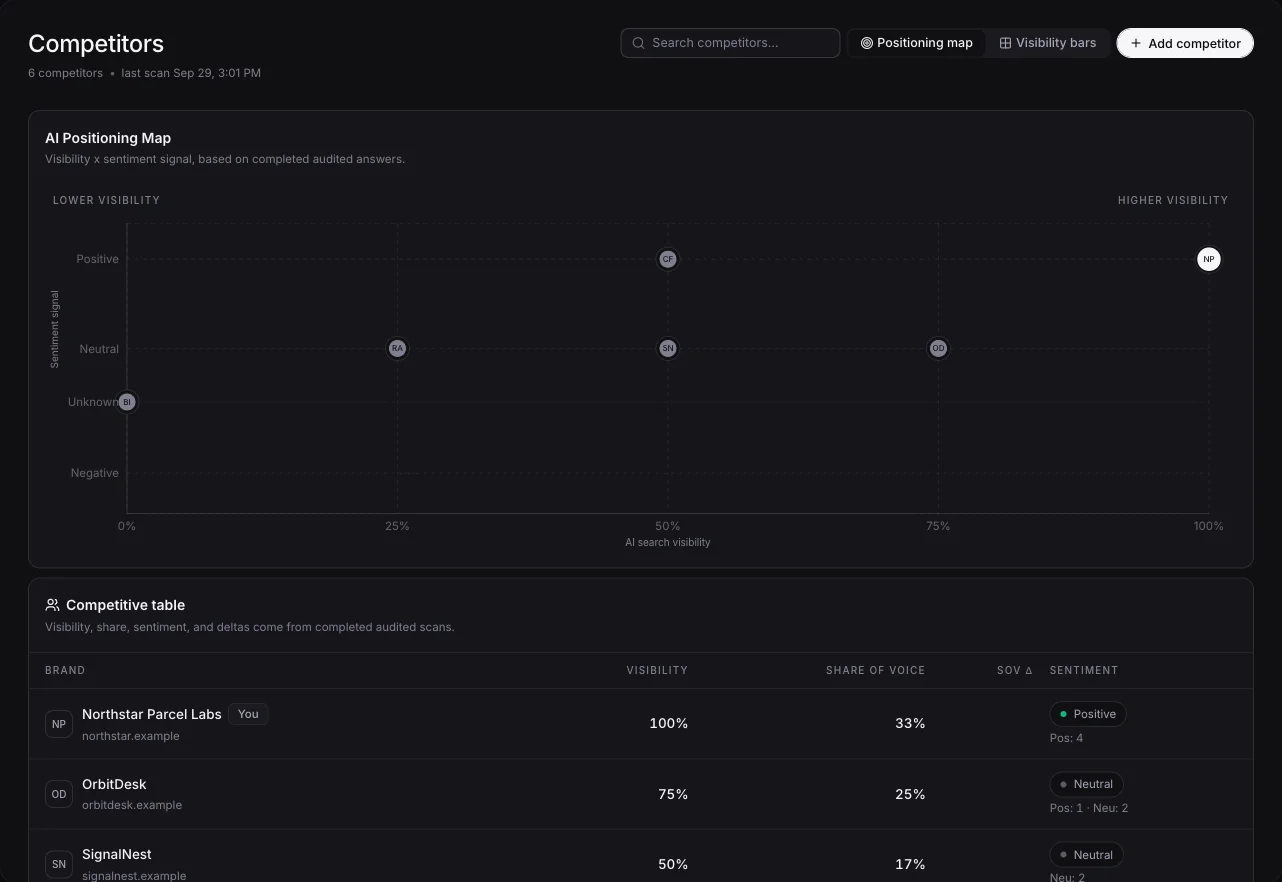
Compare Visibility %, Share of Voice %, SOV Δ, and Sentiment—a breakdown of how analyzed answers describe each brand: positive, neutral, or negative—for every tracked brand in one table.
Compare Share of Voice in percentage points after two measured scans. Check whether tracked prompts, engines, or competitors changed before interpreting a gain or loss.
Plot brands by visibility and sentiment to spot clusters, outliers, and your relative position.
Register a competitor by name and domain. The comparison may update before the next scan, because AEO can link matching historical mentions and citations, and future scans use the updated competitor list.
Open captured answers to compare which brands appear and which pages are cited.
Each scan reports Visibility %, Share of Voice %, SOV Δ versus the previous scan, and Sentiment for every tracked brand. Sentiment is a breakdown of how analyzed answers describe the brand: positive, neutral, or negative.
SOV Δ is the change in Share of Voice from the previous measured scan, in percentage points. A comparison needs two measured scans. Check whether the tracked prompts, engines, or competitors changed before interpreting movement: adding a competitor can change the total mentions used to calculate Share of Voice.
Share of Voice % values across all rows in the competitive table sum to 100% for the full tracked set, showing the proportional distribution of mentions. Filtered rows may account for only part of the total Share of Voice.
It plots each brand by Visibility % on the x-axis and Sentiment on the y-axis so you can spot clusters, outliers, and your relative position quickly.
On the Competitors page, select Add competitor, enter the competitor’s name and website domain without https:// or a page path, and submit. The comparison may update before the next scan, because AEO can link matching historical mentions and citations, and future scans use the updated competitor list.
Yes. Use visibility bars to compare how often each brand appears. The positioning map adds sentiment so you can compare both measures together.
Deleting a competitor removes it from future competitor analysis and preserves previously captured answers. AEO stops classifying its historical mentions and citations as belonging to an active competitor, so Share of Voice and citation categories can change. Organization owners and Editors can remove competitors for brands they can manage.