
New to the world of customer support? Need a handy reference of all the help desk jargons? We are here to help. Here is an exhaustive list of words and phrases relevant to anyone working in customer support.
If you find any mistakes or wish to add a new term to this list, feel free to write to us.
Want to learn more? Talk to our help desk specialists!
Agent Activity
Agent Activity refers to the complete set of actions or “engagement” by a specific support agent, on a ticket or set of tickets, within a specific time period. Agent Activity could include:
- Replies added by the agent.
- Private Notes added by the agent.
- Tickets Closed by the agent.
- Participation - Any activity, such as an attribute change done on the ticket.
Agent Activity and Agent Activity Reports are used to understand different agents and their contribution levels across all the tickets. They are usually helpful in understanding an individual agent’s performance and in different contexts for balancing the load of tickets, handled by each of them.
- Agent Activity Reports in HappyFox
Learn
More:
Agent Collision
Agent Collision refers to the scenario when there are two or more support agents, working on the same ticket each unaware of the other.
Take an example: There’s a support ticket that has been waiting for a resolution for over 48 hours. Matt from Support Logs in, to send out a reply. Unaware that Matt is on the ticket, Ben decides to log in, and do the same as well. Both of them sending out replies could result in duplicate and inconsistent communication with the end customer.
To avoid such scenarios, HappyFox has an agent collision detection feature that proactively ensures that all active support agents are well informed of who else is active on a ticket.
- Know which other agents are on the same ticket as them
- Are any of the other agents typing on the ticket?
- When another agent(s) is idle, or on a ticket
This feature allows your agents to:
- Proactive Agent Collision Detection in HappyFox
Learn More:
Agent Scripting
Agent Scripts or Call Centre Agent Scripts is an interactive guide that helps the support agents in troubleshooting a customer’s problem. Using Agent Scripts a support agent can walk through the customer’s problem, one question at a time.
Based on the customer’s answers, the support agent is guided to the next step in the process Answers at each level are also captured, and can be mapped to custom fields and ticket fields. As the agent arrives at the last step, s/he has complete context on the problem, detailed information from the customer, and a clear next step.
- Contextually Guide Your Agents With Agent Scripting
- Launching Agent Scripts in Tickets
- Create and Manage Agent Scripts
Learn More:
HappyFox provides the most configurable Agent Scripting module,
to ever exist within a helpdesk.
To learn more about setting this up, follow the links below:
Assignee
Assignee, on a ticket, refers to the customer support staff or the agent within a company working on the specific ticket.
A ticket, in its life cycle, typically goes through multiple assignees. However, at any single point in time, a ticket can only have one assignee i.e. only one support agent assigned to it.
- Quick Ticket Actions
Learn More:
Assets
Assets refer to any physical devices or software assets (authorized licenses, etc.) that an organization owns. These are “assets” registered in the name of the company, that are utilized by its employees, or management.
- Laptops, PCs or Macs provided to employees.
- Phones.
- Test Devices, available for the QA Team.
- External Accessories for the PCs etc.
Physical Electronic Devices such as:
- Licenses for Software Design tools.
- Licenses for Accounting Software
Software Assets, such as:
Asset Management
Asset Management refers to all the processes and tools (both digital and physical) that an organization uses to manage all of its assets. For more on Assets read here. Asset Management in the helpdesk context is a feature that allows the user to upload, and manage the entire list assets of their organization from one interface.
Typically used by the in-house Asset Management Team, or the Admin Team, this module allows the user to keep track of every single asset used within the organization.
- Serial Number.
- Device Name.
- Device Type.
- Device Model.
- Device Manufacturing Year.
- Device Assignee.
- Assigned Date.
A couple of common attributes per device could be:
- HappyFox Asset Management
- Creating, Editing and Linking Assets in HappyFox
- HappyFox: The Best Help Desk for IT Asset Management
- Reporting on Assets with HappyFox
Learn More:
Audit Logs
Audit Logs, or Audit Trail, is essentially a chronological time-log of all the activities done on the helpdesk, by all the users. Audit Logs are usually used to trace changes made, in the event of issues/incidents, to be able to take corrective action.
Backlog
Backlog refers to new tickets that have been created but, not addressed in any form, by a support agent yet. Usually used in association with an agent, a backlog could refer to the number of tickets, that the gent is yet to respond to. An agent’s response here could be:
- Providing the first response.
- Resolving the issue.
- Seeking more information.
- Adding any information, specific to the support process of a specific company.
Any tickets that have any of the above items pending, are termed backlogs. These backlogs are usually on an agent level and have specific SLAs set and operating on them.
- Custom Queues
- Managing Status and Priority
- Kanban View
Learn
More:
HappyFox Helpdesk has a whole host of new features that help in managing tickets and
reducing backlogs. Visit the links below, to understand these better.
Chatbots
A chatbot is an AI-powered application that runs within your live chat software and helps in interactively engaging your customers to better understand their issue. Using a conversational structure and Natural Language Processing, the chatbot asks a series of questions to an end-user and helps to zero-in on the issue.
A chatbot could either connect the customer to a Support Agent or point the end-user to relevant support resources, within your Support Centre. Chatbots are the fastest way to ensure that your customers receive the fastest support experience.
- HappyFox Enterprise AI-Powered Chatbot
- HappyFox Chatbot - Features & Benefits
- 10 Chatbot Designs for Inspiration - HappyFox Blog
Learn
More:
Canned Responses
Canned responses are re-usable templates, that a support agent can quickly add to a ticket, to speed up typing the response. Mainly used for frequently asked questions, canned responses also provide a standardized way of replying to critical questions, across different support agents.
- Using Canned Actions for Frequent Replies
- Using Canned Actions, to speed up your ticketing.
- Section: Canned Actions
- Canned Actions in HappyFox
Learn
More:
HappyFox provides the most flexible ways of setting up and using canned actions. Visit one
of the links below, to know more:
Contacts
When an end-user creates a ticket within a Helpdesk, they are added as a “contact” in the help desk system. The Contact on a ticket refers to the person for whom the ticket has been raised. This person receives updates on the ticket directly and is also the affected party, for whom the specific issue has been raised.
A contact list refers to a tabulated list of all the contacts that exist in the system. These contacts are auto-populated and saved when they create an entry in the helpdesk.
- Managing Contacts
- Add customer contacts
- Managing contact groups
Learn More:
Contacts module in HappyFox lets users view and modify all of the customers whose tickets
have been created within the Help Desk.
Contact Group
A contact group is a set of contacts grouped together based on specific criteria. This could be a company, or a specific set of plan based customers, or a set of customers who require specific kinds of access. Contact groups can be set up and created to help address the specific needs of such an audience.
- Managing Contact Groups
Learn More:
Customer Portal
Customer Portal or the Support Centre refers to that part of the help desk application that faces its user base. The customer portal usually contains FAQs, Knowledge Bases, and a New Ticket Form which lets a user create new tickets.
The primary purpose of a customer portal is to address all the issues that the end customer of a company would face and provide for an interaction point where these can be addressed. A customer portal is commonly a module tightly integrated with a help desk.
- Setting up your Support Centre using HappyFox
- Setting up a KB using HappyFox
- Setting up New Ticket Form on HappyFox Help Desk
- HappyFox Self Service Portal
- Accessing support centre and customer portal
Learn More:
Customer Satisfaction Survey (CSAT)
Customer Satisfaction refers to any metric that directly measures the happiness of a customer based on the resolution of an issue. Customer Satisfaction is commonly measured through a CSAT score.
A CSAT or NPS score tells the reviewer, how much of an effective resolution an issue or a ticket has received, and what the customer feels about it.
A customer satisfaction survey, in essence, is a form sent out by support agents after an issue has been resolved to understand what the user thinks of the quality of support provided. A customer satisfaction survey could ask users questions such as:
- How happy are they with the resolution of the issue?
- How happy are they with the time taken to resolve the issue.
And so on.
Customer Satisfaction Surveys can be either manually sent out or set up to be triggered when a ticket reaches a specific ticket status. Learn more about how you can do this within HappyFox by visiting one of the links below:
- Managing Satisfaction Surveys
- Collecting customer feedback
- HappyFox as a customer service software
Learn More:
Email Ticketing
The functionality of a help desk that allows a user to create tickets via email, is broadly referred to as Email Ticketing. Email ticketing lets a user create tickets by sending in an email to a predefined mail address, without logging into the support portal as such.
These email addresses are usually generated by the system and help serve as the first point of entry for any ticket creation. A Support Agent can then begin conversations with an end-user from here, via tickets, each of which continues and adds onto the existing conversation.
- Email Support Help desk
- Multiple Mailbox Accounts
Learn More:
Feedback
Feedback in the context of helpdesk or any support interaction refers to listening to what a user thinks/feels about something in specific. For instance, a support member could reach out on feedback for a recent issue they’ve closed for a customer, or a product team member could reach out asking for feedback on a recently rolled out feature.
Frequently Asked Questions (FAQs)
Frequently asked questions or frequently answered questions, as the name suggests, refers to repeated questions that a support community or a forum may receive from time to time from its user base.
A support team, in that case, could choose to have these converted and added to an FAQ section on the website, for users to be able to quickly sort out their queries. FAQ sections are generally hosted on the Knowledge Base section of the website, as a single article or a series of articles.
- HappyFox Knowledge Base
- HappyFox Support KB
Learn More:
First Response Time (FRT)
The first response refers to the first reply from a support agent to a customer’s ticket. Usually from the support agent assigned to the ticket, this response is usually very important in tracking metrics and SLAs within a ticketing system.
The first response time is used to measure the time taken for a ticket to receive the first response from the time the ticket was created. This forms a key core SLA that is then used to drive automation and set support standards.
Frequently also, this metric is used in measuring support responsiveness and is used as a metric of the team’s effectiveness.
- Analysing response stats
- HappyFox Support KB: Responding to tickets
- Helpdesk Features Index
Learn More:
Learn more about how
you can work with SLAs, and Reporting
using HappyFox, to improve the efficiency of your support teams
Help Desk
A Help Desk Software is the center-point of the entire customer support ecosystem. It is the main application that forms the link between the customers of a company and the support team. A help desk application contains tickets, each of which is essentially a single communication thread on a specific issue, that both agents and customers can collaborate on.
- What is a Help Desk?
- Help Desk Feature Comparison Scorecard
- How to set up a Help Desk?
- HappyFox Help Desk - A quick start guide
Learn
More:
HappyFox Help Desk provides top-of-the-line features to manage and organize your support
processes, and build your entire Support Centre ground up. Visit the links below to learn
more about what we have to offer:
Alternatively, contact us to schedule a quick demo from our Product Experts.
Help Desk Report
A Report, or Reports or Reporting is a collection of data, usually tabulated or in the form of chats and other visualizations that aim to capture a certain performance Metric or metrics related to support. This could be:
- Agent Activity Reports
- SLA performance reports
- Satisfaction Survey Reports
A good helpdesk application usually provides a reports section within the app with the above and more reports, that help key support leaders track and improve the quality of their support organization.
- HappyFox Support KB: HappyFox Reports Explained
- Help Desk Reporting
- HappyFox Support KB: Creating a custom report
Learn More:
Learn more about how you can leverage HappyFox Reports to improve the performance of your
support teams, and the quality of your support in general
Knowledge Base
A Knowledge Base refers to a self-help section within a Helpdesk, containing articles and help-text about the product and its features. Serving as a setup guide of sorts, these articles are usually supported with Product/Feature demonstration videos, that could help a user setup or troubleshoot specific features or onboard them onto using a feature or module better.
Armed with a Search functionality, Knowledge Bases let the end-users search and troubleshoot problems by themselves. The more comprehensive a knowledge base is, the more educated an end-user is, and the lesser number of support tickets an agent has to deal with.
Alternatively comprehensive Knowledge Bases, also help a support center agent redirect a user to these, to help themselves when they choose to reach out via a direct support channel.
Key Performance Indicators (KPI)
A Key Performance Indicator or KPI is one single metric that can be used to measure something specific. For instance: An average response time, could be a KPI to measure the time taken by the entire team overall to respond to a new ticket. A few more examples of KPIs are:
- Average Customer Response Time.
- Average Time in Status.
- Average Time in
Each of these metrics could help us measure the performance of a support agent, or arrive at an understanding of the team overall.
- All In One Customer Support Dashboard
- Essential Helpdesk Metrics
- HappyFox Custom Dashboards
Learn More:
Learn more about understanding your KPIs in-depth, and all the KPIs that HappyFox Help Desk lets you
explore:
Lifecycle Reports
Lifecycle refers to the time that a ticket spends on a specific ticket attribute. This could be an assignee/status/priority etc. For Instance, let’s assume we have a ticket A, that gets c
- Creating Lifecycle Reports
- HappyFox Reports
- HappyFox Support KB: Creating a custom report
- HappyFox Support KB: What are scheduled reports
- HappyFox Support KB: Inflow reports
- HappyFox Support KB: Custom Dashboards explained.
Learn More:
Merge Tickets
Often, in a support context, a customer could end up creating duplicate tickets for the same issue. This could either be because of an email sent in twice, or because a customer wasn’t aware that it had already been created.
Either way, this creates a scenario where are there two tickets about the exact same issue. For such a scenario, HappyFox lets a user merge these tickets. Assuming there are two tickets, A and B, when an agent merges ticket A onto ticket B - all the conversation from ticket A gets moved to B, and A gets moved to a closed status
The support agent can now manage all customer conversations from Ticket B.
Note: For two tickets to be merged, they need to be from the same contact/ticket creator.
Multi-Brand Help Desk
A helpdesk that provides enough bifurcation for a company to set up and manage its multiple brands under one login.
- HappyFox Multi-Brand Help Desk
- HappyFox Support KB: Setting up a Multi-Brand Helpdesk
- HappyFox Webinars: Creating a multi-brand helpdesk
Learn More:
Net Promoter Score (NPS)
Net Promoter Score® is a metric that measures customer loyalty, by identifying what percentage of a product’s users could be “promoters” themselves. These are users that love your product and would promote them, amongst new and possible.
- Promoters: Score of 9 or 10, product champions, usually informal evangelists of the company amongst your users.
- Passives: Score of 7 - 8, product’s current users, but not particularly so happy and could switch to a competing product.
- Detractors: Score of 6 or lesser. These people are unhappy with your product offering and possibly could even result in negative word of mouth.
Measured on a scale of 0 to 10, NPS® categorizes the user as:
By giving the users this fundamental classification, NPS helps categorize and understand your users and their general happiness level with your product.
Note: Net Promoter, Net Promoter Score, and NPS are trademarks of Satmetrix Systems, Inc., Bain & Company, Inc., and Fred Reichheld.
- What is Net Promoter Score?
Learn
More:
New Ticket Form
New Ticket Form is the user-facing form that is used to create new tickets within a ticketing system. This form usually captures the bare minimum information required to create tickets for a specific user:
- Contact Name.
- Contact Email
- Contact Phone.
- Ticket Subject
- Ticket Body
New Ticket Forms can also be customized to include custom information per each support team’s requirement. This can be achieved using custom contact fields or custom ticket fields.
- HappyFox Support KB: Customizing New Ticket Form
- HappyFox Support KB: Creating a ticket via the support centre
- HappyFox Blog: Configuring the new ticket form
Learn More:
Omnichannel Support
Omnichannel Help Desk Software engages with customers across multiple channels of communication to provide a unified customer experience. The key stakeholders involved here are the customers raising issues or queries and the agents resolving them. Omnichannel ticketing systems increase efficiency, flexibility, and speed of resolution.
When we use the word omnichannel, we’re essentially referring to a presence of support regardless of whatever channel that it maybe.
Here are the different channels in which customers tend to raise issues and queries. In each of the cases, a support ticket gets created. This helps to streamline the customer requests to a single repository.
- Email: Customers write to a support email id. The Help Desk Software detects this and initiates a ticket.
- Voice Support: Phone calls between a customer and an agent initiate a ticket creation. Organizations that provide phone support are backed by call center software like RingCentral and Aircall.
- Social Media: Integrate with platforms like Facebook and Twitter. Each post triggers a separate ticket.
- Customer Portals: It is a unified interface for customers to access multiple support resources like self-service articles, ticket history, live chat and so on. Customers can create tickets by filling a form.
- Support Widgets: These widgets are web-forms that can be embedded on any website or mobile app. Customers can create tickets without leaving their context.
- Live Chat: Most of today’s chat software has integration with Help Desk systems. Every chat conversation converts into a ticket with the entire chat transcript as a ticket attachment.
- Chatbots: AI-Powered chatbots engage with users automatically. It can respond proactively to messages, analyze and understand an incoming message and provide an appropriate response in real-time.
- Other Sources: Ticket creation can also be based on triggers from external systems. In such situations, integrations enabled through APIs and webhooks helps the system achieve it.
Overdue Ticket
The overdue ticket is a ticket that has an actionable pending on it, for which there was a hard deadline. This actionable could be:
- A support response
- A pending action
- A move to a status
- A complete resolution
- A ticket closure
An overdue ticket usually demands the highest attention, and it is order-of-the-day to have support processes that track these tickets and ensure closure as soon as possible on them
- HappyFox Support KB: Setting due date on a ticket
- HappyFox Support KB: Performing bulk actions on tickets
Learn More:
Private Note
Private note, is an internal note left by a support agent, on a ticket, for the rest of the team members or relevant subscribers on a ticket to see. A private note essentially is internal and does not send out a response to the customer and hence can be used for internal communication purposes.
Quick examples of some use-cases that could help:
- A QA team leaves a private note on a ticket, before assigning it to a Dev member, for them to understand what a support issue is about.
- A support team member leaves a private note on a ticket, for a QA team member, so that that they have all the necessary information required to begin work on the ticket.
Assuming each of the above terms was a status, each could be interpreted as an “Open Status” where work by a specific team was happening.
- HappyFox Support KB: Adding a private note
- HappyFox Support KB: Collaborating using private notes
- HappyFox Video: Private Notes
- HappyFox Support KB: Call notes for Voice Channel tickets
- HappyFox Support KB: Adding private notes using email
Learn more:
Reassigning a Ticket
Moving a ticket from one support agent to another is called re-assigning. Re-assigning usually happens when a ticket could be better suited for another team member or another team or if it requires a follow-up.
- HappyFox Support KB: Bulk Re-assigning tickets across different agents
- HappyFox Support KB: Set agent availability for ticket assignment
- HappyFox Video: Assigning tickets
Learn More:
Reopen a Ticket
When a ticket is moved from a closed status to any of the open behavior statuses, it considered being reopened. Tickets are usually re-opened when an older issue has surfaced and requires a ticket closed earlier to be re-opened.
Ticket statuses and customizable workflows, let Helpdesk software achieve this, thereby reducing new ticket creation for repeated un-resolved customer issues.
Scheduled Tickets
Scheduled tickets are a way to automate ticket creation for tasks recurring within specific time-frames. Using scheduled tickets, a user can have tickets created automatically on specifically defined days/months or dates. These scheduled tickets can also be set to recur until a specific date after which they can automatically be stopped.
For instance, let’s assume a specific Server Maintenance task has to recur for an IT Admin employee, every month on the first Friday. To help the user track this, we could set up a scheduled ticket with the following attributes:
- Gets created On First Friday
- Repeats: For a time period
- Assigns to: IT Admin Assignee.
This helps remove the stress of having to create these tickets repetitively, and also ensures that no critical recurring business workflows are missed out.
Service Level Agreement (SLA)
Service Level Agreements, SLAs in short, are commitments made by a business to its customers. In the context of Helpdesk and Customer Support, these define, time-frames within which a Ticket Reply, Update to a Customer or a resolution needs to happen on any customer ticket.
SLAs, are also used within Support Teams, to define standards and help setup support processes. Regardless of the use-case, SLAs can be completely customized and configured to fit the Work Hours of different teams.
- SLA in HappyFox
- Creating and Managing SLA’s in HappyFox
- Implementing Service Level Agreements (SLA)
Learn More:
Support Channels
Channels refer to the different mediums through which a ticket can get created in a Help desk. A quick list of the different possible channels are:
- Call
- Social Media
- Chat
- Forwarded Mails
- Direct Customer Forms
- HappyFox Webinars: Unifying customer support channels
- HappyFox Support KB: Setting up channels
Learn More:
Smart Rules
Smart Rules are Automations within HappyFox Help Desk that automatically perform a certain action on a ticket if it satisfies a condition. A Smart Rule is structured as follows:
- A MATCH ALL Condition
- A MATCH ANY condition
And a subsequent
- Perform the Action block.
Currently, HappyFox Help Desk lets a user perform a variety of actions that include, but are not limited to:
- Sending Emails
- Changing ticket to a specific status.
- Adding a subscriber to a ticket..
- Changing a ticket to a specific assignee.
And more.
- HappyFox Support KB: Smart Rules
- HappyFox Support KB: Creating and managing Smart Rules
- HappyFox Blog: Filtering emails using smart rules
Learn More:
HappyFox provides the
best SmartRule based automation to fasten up your workflows.
Ticket Templates
In helpdesk ticketing use-cases, it’s common to find yourself having to create similar tickets over and over. In recurring tasks like these, ticket templates provide an easy way of building one template that can then be reused whenever required.
Ticket Templates also help pre-fill specific values for all the different ticket and contact fields within a new ticket form, before creating the new ticket. HappyFox provides some of the most customizable ways of setting up ticket templates. Read more about these here.
Ticket Lifecycle
From the time a Support Ticket is created in a help desk to when it gets resolved, a ticket passes through multiple stages, with different Support Agents working on it in each stage. The entire journey of this ticket, beginning from the starting, till resolution, is termed as a Ticket’s Lifecycle.
- New - When a ticket is created
- Open - When a Support Agent is looking into the ticket.
- In - Progress - When a resolution is in progress
- Solved - When the issue has been solved
- Closed - When the customer has been updated, and the ticket closed
E.g. In terms of Ticket Status, these could be:
- New Ticket Received: Marta- Support Team - New Status.
- Assigned to Relevant Team: Bill- Tech Team - Opened Status.
- Re-assigned to correct staff: Jason- Tech - In-Progress Status.
- Resolved Issue: Jason - Tech - Moved to Solved Status.
- Updated Customer and Closed the ticket: Jason - Tech - Moved to Closed Status.
In terms of Support Agents working on these, it could be:
HappyFox offers the above five statuses, as defaults in every account. Each of these is completely customizable, can be ordered, and more can be added to them to better suit your specific support process and ideal ticket lifecycle.
- Manage Ticket Statuses – HappyFox Support
- Creating and Modifying Ticket Statuses – HappyFox Blog
- Manage Support Agents – HappyFox Support
Learn
More:
Learn more about how HappyFox lets you customize your ticket flow, by visiting the links
below.
Ticket Fields
Ticket Fields are either built-in or custom fields created by a user, designed to capture some information related to the ticket. For e.g.: ticket assignee, contact or ticket subject.
In HappyFox Help Desk, a user can set up custom ticket fields, for their specific help desk needs, and have them associated with different categories. This customizability provides the end-user with the ability to capture information specific to their issues.
- Account Administrator in HappyFox Help Desk
- Managing Ticket Custom Fields
- Understanding ticket creation for agents.
- Creating Ticket and Contact custom fields.
Learn
More:
Ticket
A ticket is a piece of communication, between a support agent, and a customer. A Ticket is the most central piece to the support ecosystem and the medium through which a support agent and a customer interact.
Using a help desk software, companies can set up customer-facing Support Centres, that allows a user to send in their issues, by filling out a form or getting on chat. A support agent is assigned to the ticket, routes it via the respective teams, allowing them to resolve the customer’s issue.
Ticket Resolution
Resolution refers to a ticket issue getting resolved. When a ticket resolution is said to be expedited or sped-up, a ticket is taken up for priority handling by support agents and closed as fast as a process could permit.
A ticket is considered to be resolved when the core purpose for which was created has been achieved. This could be:
- A customer issue.
- A feature bug, missed by QA but caught by the end customer.
- A Billing inquiry or a refund request.
- Any other unique use-case based on the product offering of the company.
- HappyFox Webinars: Mean-time to resolution
- HappyFox Blog: Reducing ticket resolution times
Learn More:
Task Management
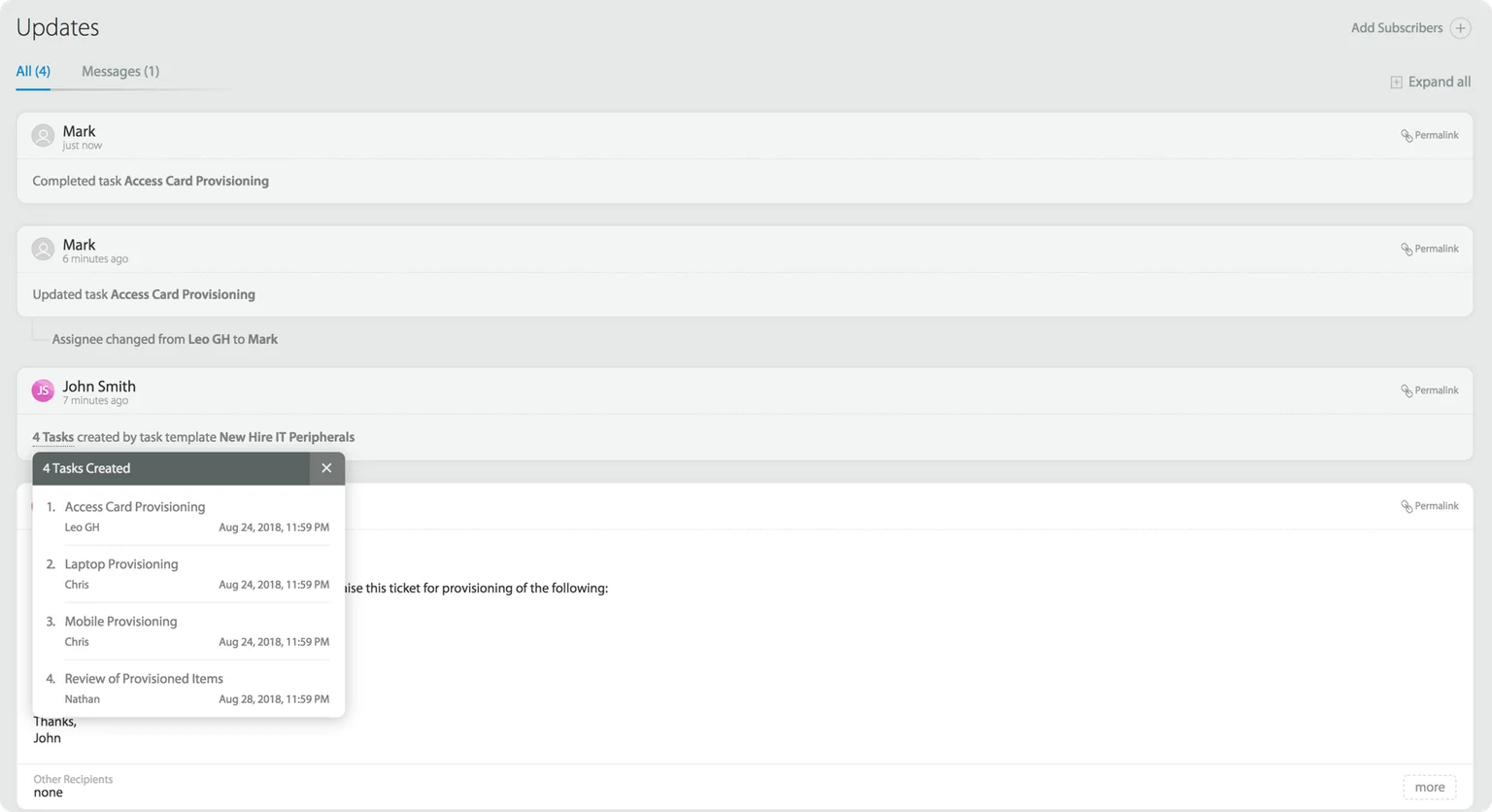
A task is a small individual work item on a ticket that can be allocated to an individual user and then tracked via a ticket. For instance, a new employee onboarding ticket could have multiple smaller tasks in it. Take an example:
- A devices task, for an Admin Employee.
- An HR onboarding task, for the HR team.
- A Product Intro task, for a Product Team member.
- A Facilities task, for ID cards and access control to a building team member.
All these are smaller tasks that could be attached to a ticket, that help in breaking down a larger work item.
When a tool or an app lets a user create, edit, assign and manage a set of tasks, each with different members of a team responsible for it, it is said to do Task Management. Task Management is a simple but effective way of breaking down a master level work into smaller subtasks, to speed up resolution and increase individual accountability.
Using task management it is easy to understand what work is assigned to whom, and what are the individual deadlines.
- Task Management using HappyFox
- HappyFox Support KB: Creating and using task templates
- HappyFox Support KB: Creating and managing tasks within tickets
Learn More:
HappyFox lets you create and manage
tasks from within tickets,
which provide the best context possible. Learn more about building and setting up your
task-based workflows, using Task Management. Visit the links below:
Ticket Properties
Ticket properties refer to all the multiple attributes of a ticket that can be changed and modified to reflect the accurate status of the work item that the ticket corresponds to. Ticket attributes could be:
- Ticket Assignee
- Ticket Status
- Ticket Category
- Ticket Due date settings
- Ticket Contact
- Ticket Alert settings
- Ticket Subscribers etc.
- HappyFox Support KB: Quick ticket actions
Learn More:
Ticket Forwarding
Ticket forwarding refers to the functionality that allows an end-user to forward a ticket from within a Helpdesk to an external mailbox. For situations where a user needs to get in touch with a third-party vendor, or someone without access to a Helpdesk, ticket forwarding helps in ensuring that they can get the context of the issue, without having to access the tool in specific.
- Video: Forwarding tickets using HappyFox
- HappyFox Support KB: Forwarding tickets
Learn More:
Learn more about
working with ticket forwarding within HappyFox. Visit one of the links below:
Ticket Inflow Reports
Ticket inflow is the metric used to refer to the volume of tickets getting created within a Helpdesk, in a specific time period. This is a metric that is important for support team managers to predict and plan for Agent Availability.
- HappyFox Support KB: Inflow Reports
- HappyFox Support KB: HappyFox Reports explained.
- Helpdesk Reports
- HappyFox Support KB: Creating a custom dashboard
Learn More:
Ticket Priority
Ticket Priority is a ticket attribute that determines the degree of importance that is supposed to be given to a ticket. Priority levels could be:
- Low - For issues that can be prioritized to be worked on later.
- Medium - For mid serious issues that would need to be taken up in the near priority.
- Normal - A default status that can be a landing priority for a ticket.
- High - High in importance, and needs to be addressed ASAP.
- Critical - Usually a production stopper, and receives the highest focus.
- HappyFox Support KB: Managing priorities
Learn More:
Ticket Status
Ticket Status, a ticket attribute that is used to understand what stage of resolution the ticket is in. Statuses by default could be:
- New
- Open
- In-Progress
- Solved
- Closed
But statuses within HappyFox are customizable and can be used to accurately reflect the different stages of resolution, based on each support team’s workflows.
- HappyFox Support KB: Managing statuses
Learn More:
Read more about customizing and
building your own status based
workflows, and Automations within HappyFox. Visit one of
the links below:
Work Schedule
Work schedule refers to the work hours within which a Support Team is available to take chats. Work schedule, Work hours or Business hours, drive the entire support operations. Generally, work-schedule hours are when the other rules of business also apply. For Eg:
- SLAs could be defined based on business hours.
- Smart Rules ccould be defined to operate on these hours.
- Chat Widgets on the Website could be made available/unavailable based on these settings.
Work schedule, whenever mentioned has a tie-in with the timezone. Typically work schedule can be designed to work within the time-zone of specific agents. This information is usually picked up from the account level setting per agent.